
Review before signing.
Never approve a transaction you do not understand.
Meet Coinductor, the self-custodial crypto wallet built around your next send. Keep fees affordable with Smart Send, use OTO Pass when TRX runs short, and approve website payments in your wallet.
Currently available for TRX and USDT on TRON.
Feature eligibility
varies by transaction.
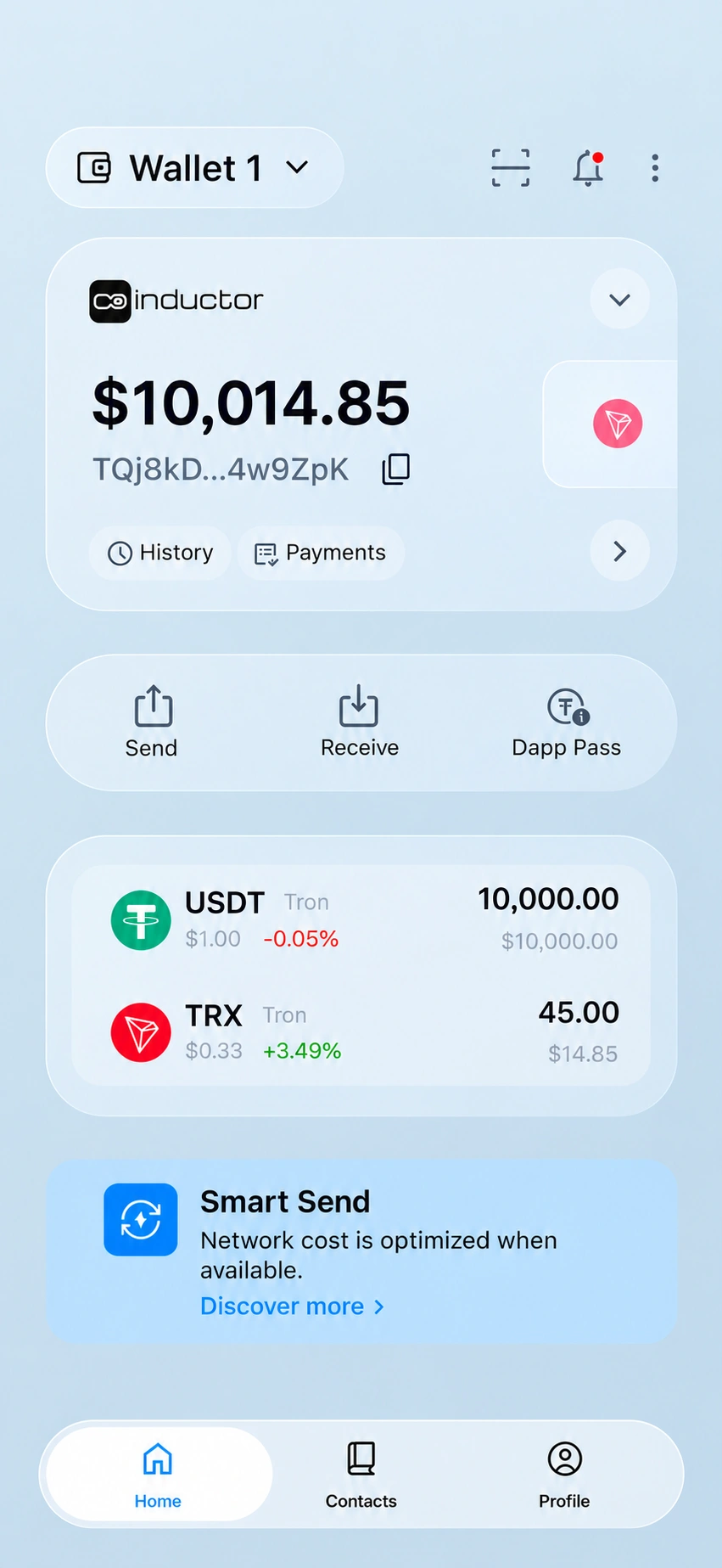
Have TRX, running low, or already have a provider pass? Find the option that fits your transfer.
Feature guide—not a live wallet check. The app confirms your options before sending.
Send supported USDT transfers with up to 70% savings on the network fee. Smart Send uses TRX in your wallet. Check the displayed fee before confirming; savings depend on the transfer and network conditions.
Smart Send fee: US$1.50, paid in TRX. The TRX equivalent varies with the exchange rate.
If a lower-cost route is unavailable, the standard TRON network cost may apply.
Requires TRX. Savings vary with the transaction and network conditions.
How Smart Send works ↗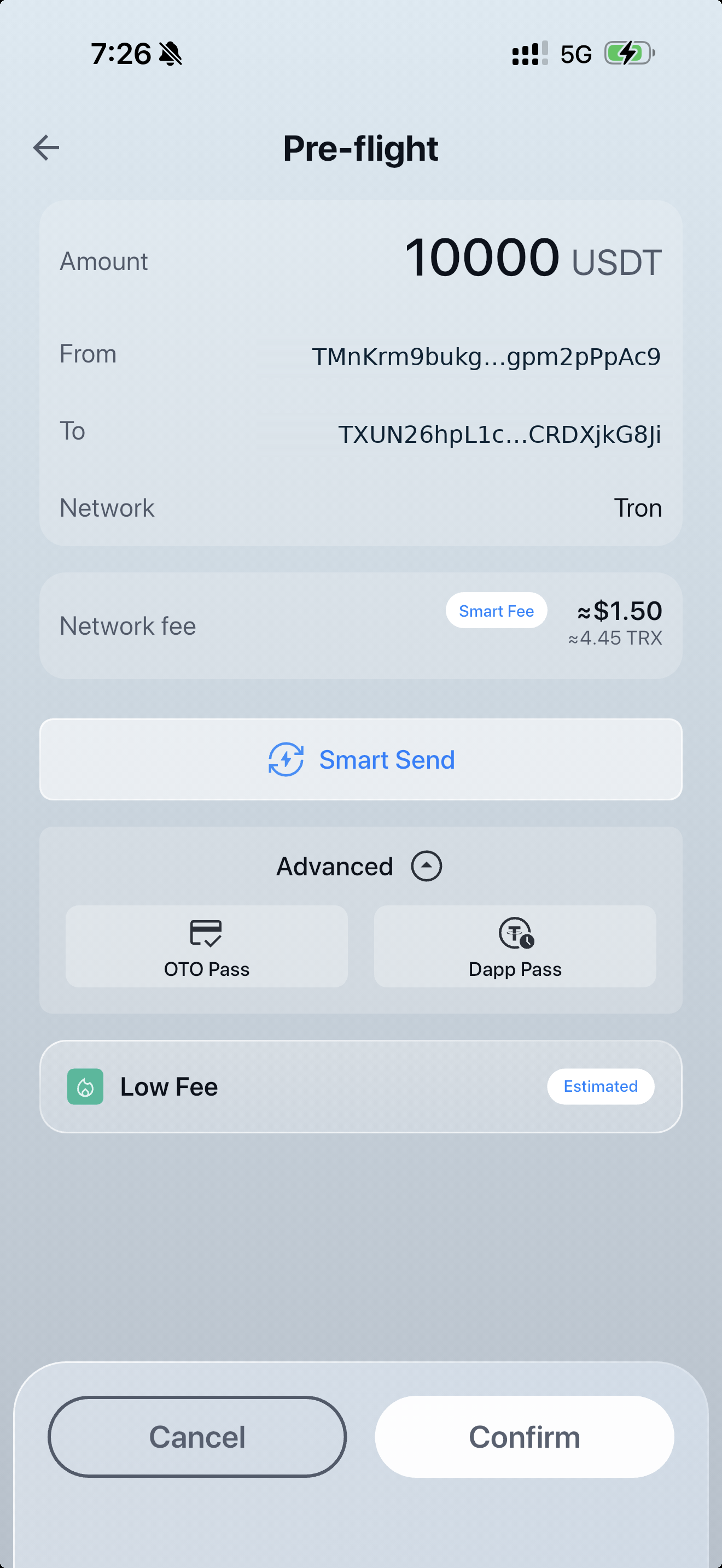
Your USDT is ready, but you don’t have enough TRX for the fee? Choose OTO Pass in Coinductor to enable an eligible transfer without first obtaining TRX elsewhere. Review the transfer details and local pass price before confirming.
OTO Pass is a separately purchased, single-use software feature. OTO Pass must be available for the transfer. Check the app for eligibility, the purchase price and any wallet-activation requirement.


Already have a pass from a supported provider? See its status and remaining allowance in Coinductor, ready to review before your next eligible send.
Your provider sets what the pass includes and how long it lasts.
Passes are purchased from independent providers. Provider terms and transaction eligibility apply.
Understand DApp Pass ↗Use eligible provider access within the transaction flow. Review the details and sign in your wallet.
An explanation of the feature—not a live pass status or a package offer.
Scan to sign in to a supported website, choose what you want and continue to checkout. The payment details arrive in Coinductor for your review—no copying wallet addresses or amounts between screens.
See how connecting and paying works ↗Available with participating services and supported transactions. Website identification helps you understand who is making the request; it is not a guarantee that a website is trustworthy. Always review the website, amount, recipient and network before signing.
Let customers connect with Coinductor and review your website’s payment requests in their wallet.
Review and approve transactions in your wallet. Keep your recovery phrase private and securely backed up.
Self-custody does not remove device, third-party or blockchain risks. Public blockchain transactions can be visible to others.
Understand self-custody ↗Never approve a transaction you do not understand.
Anyone with your recovery phrase may gain control of your wallet.
A blockchain address does not make your activity anonymous.
Help people connect their wallet and review payment requests without leaving the Coinductor experience. The wallet owner approves the transaction.
Explore the Coinductor Auth integration guide. Reference examples are available through developer access.
Explore Developers ↗Guides, product updates and practical explanations of self-custody and transaction costs.
Start with how TRON fees work and what a USDT transfer really costs.
Visit the Blog ↗Additional assets, networks and features are planned. For now, explore the capabilities available on TRON.
Planned features are not available today. Scope and release timing may change.
Yes. Coinductor is available for Android on Google Play and for iPhone (iOS) on the App Store. Use these official store links to download the app. Availability may vary by region and device. Then create your wallet.
Coinductor is a self-custodial wallet, not a cryptocurrency exchange. You use it to manage supported assets and approve transactions.
The current release supports TRX and USDT on TRON. Additional assets and networks are planned, but are not available until released.
OTO Pass can enable an eligible supported transaction without TRX in the sender wallet when OTO Pass is available for that transfer. Smart Send requires TRX. Check the pre-flight screen for eligibility, costs and any activation requirement. Read the OTO Pass guide or what to do without enough TRX.
Neither. OTO Pass is a separately purchased, single-use SaaS feature. The applicable purchase price is displayed before confirmation.
Check the status shown in the app before retrying. An unused pass stays active for your next send. For purchase terms, see the OTO Pass policy. Do not assume a failed transaction has no network cost. See help for a pending transfer or a failed transfer.
We cannot recover your private keys or recovery phrase for you. Keep a secure backup and never share it with anyone claiming to be support. To restore a wallet from your own backup, see Import an existing wallet.
A wallet connection may establish control of an address. It does not by itself verify someone’s legal identity or replace any identity checks required by another service. See how to connect to a website.
Get Coinductor on iPhone or Android. Your next send starts here.


Currently supports TRX and USDT on TRON. Availability varies by region and device. Optional features may involve separate charges.